Excel workbook
Month-End Close Workbook for Small Business Books
A real month-end close in one Excel file. It tells you when a rec does not tie, which variances still need an answer, and when the period is ready to lock.
$19 one time · 14-day full refund · example and blank copies · download link by email
Buy now, $19 Free close checklist
🌙 The desk is asleep. The store never is.
Every kit and ebook downloads the moment you pay, day or night. Questions get answered after we open in the morning.
Browse the storeWho it is for
Owners who do their own books, bookkeepers who close for several clients, and anyone who has been told to "close the month" without a checklist.
Not the right fit if
You want someone to close the books for you, or your accounting software already runs a close checklist and bank rec you trust.
Why it is different
- The checks tell you what is wrong. A rec that does not tie says so, and a blank workbook does not pretend to be reconciled.
- Variances are flagged only when they pass both a percent and a dollar threshold, so tiny accounts do not bury you in flags.
- Formulas, not hardcoded numbers. Change an input and everything recalculates.
Free tool: Bank reconciliation not matching? Find the difference
What is inside
- Setup. Company, month-end date and your variance thresholds. Every date and schedule reads from here.
- Checklist. 30 steps over five business days, with owners, due dates, status and a percent-complete. Overdue open items turn red.
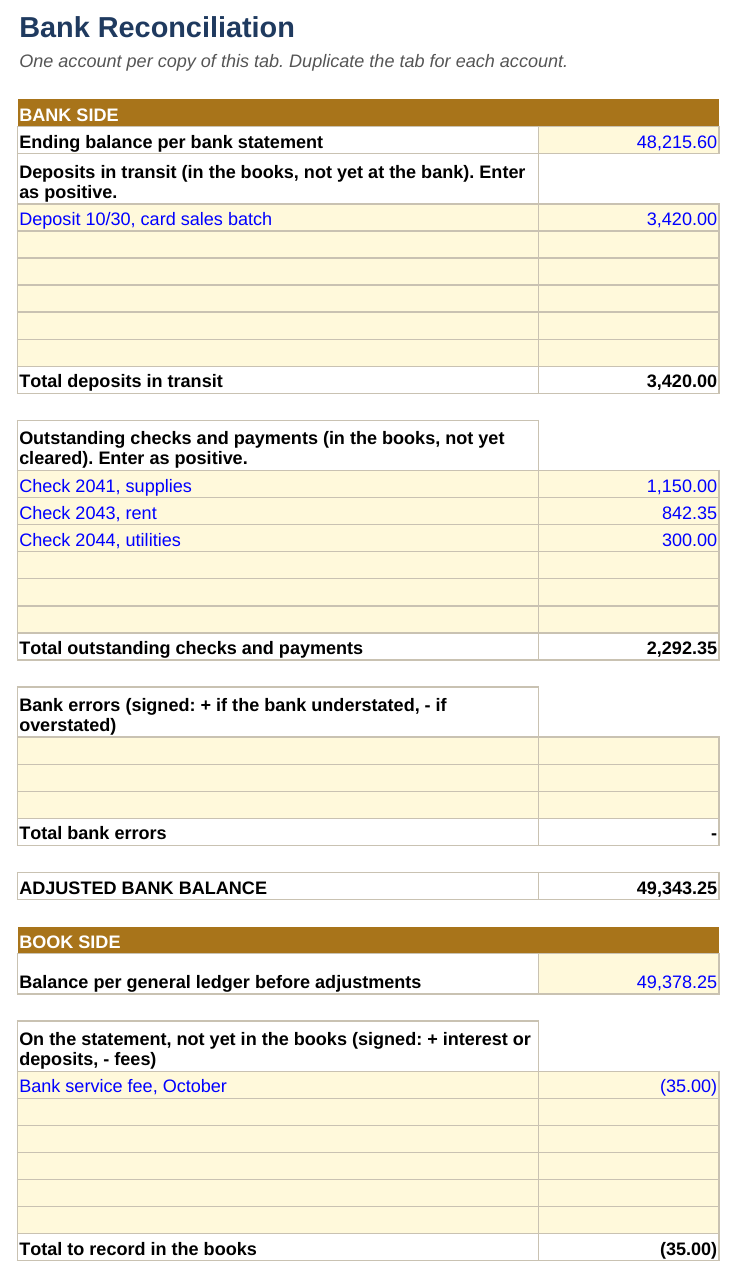
- Bank Rec. Statement balance, deposits and checks in transit, book errors. Says RECONCILED or DOES NOT TIE, with hints when it does not.
- Prepaids, Accruals, Depreciation. List the items. The tabs calculate this month's entry and the balances to carry.
- Flux. Current month against prior month and budget. A variance is flagged until you write the explanation.
- Trial Balance and Journal Entries. Both check that debits equal credits.
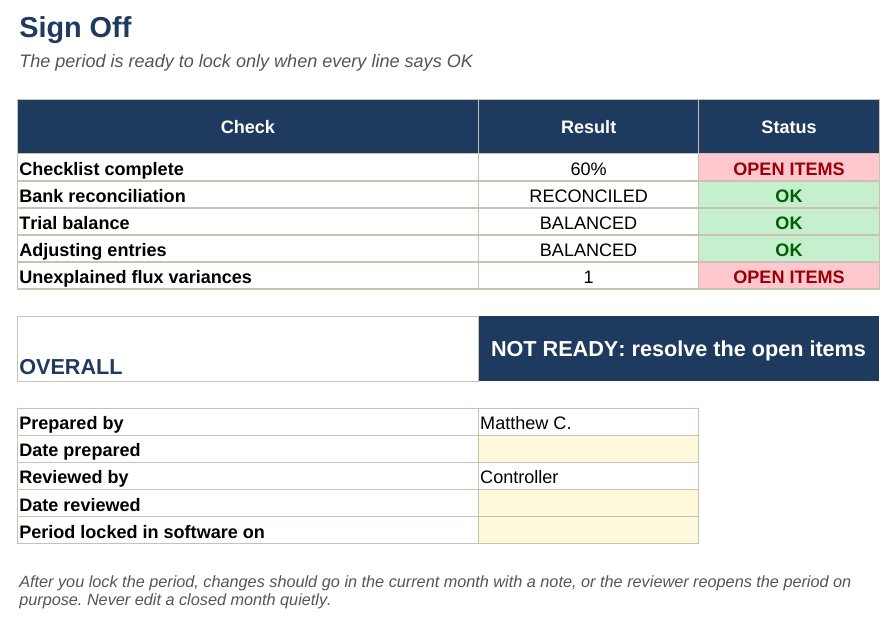
- Sign Off. When every line says OK, it says READY TO LOCK THE PERIOD.
A look inside
Example data, real formulas
Get it
Month-End Close Workbook
Or pay with PayPal
Uses the email and terms box above. You get the same download link by email.
Want every toolkit? The toolkit membership includes all of them, with a lower rate if you pay yearly.
Get every update for a year, $29: the Yearly Updates Pass gives you each refreshed edition we release of the kits you own. One payment, no automatic renewal.
Free
Month-End Close Checklist (PDF)
The five-day close, one page to print. Enter your email and we send a link to confirm it is yours, then the download. We may email you about new toolkits, and every email has an unsubscribe link.
Delivered as a zip with a filled example and a blank copy. Built for Excel, tested in LibreOffice; it should open in Google Sheets but not every feature is tested there. For one business, your own use. General information, not accounting, tax or legal advice. Payment is handled by Stripe. If a file will not open or something looks wrong, reply to your order email and we will make it right.
Questions
Common questions
What do I get and how is it delivered?
The Month-End Close Workbook as two Excel files in one zip: a filled-in EXAMPLE so you can see every tab working, and a BLANK copy for your own numbers, plus a README. The download link arrives by email after payment.
Will it open on a Mac, Google Sheets or my phone?
Built for Excel and tested in LibreOffice, which runs on Mac and Windows; it should open in Google Sheets, but not every feature is tested there. Phone spreadsheet apps are not tested. If a file will not open or something looks wrong, reply to your order email and we will make it right. If it is not right for you, email us within 14 days of buying for a full refund.
Is this legal or tax advice?
No. The workbooks organize your numbers; they are general information, not accounting, tax or legal advice.
Is it the right fit for me?
It is made for owners who do their own books, bookkeepers who close for several clients, and anyone who has been told to "close the month" without a checklist. Skip it if you want someone to close the books for you, or your accounting software already runs a close checklist and bank rec you trust.
Read the book
Bookkeeping Fundamentals
A college-level bookkeeping course, without the tuition. By Matthew Colt, $9.99 as an ebook (EPUB and PDF).
Also from MCC Solutions
Sales-Channel Profit Tracker
Which channel makes you money, and which one only looks busy? Sales minus cost of goods, shipping, platform and card fees and event costs, by channel, by event and by month.
$24
QuickBooks Cleanup Kit
A structured way to clean up books that got away from you, and a status page that says plainly whether they are ready for tax prep or a lender.
$29