Document pack
Hybrid and eClosing Guide for Signing Agents: Closing Types, eNotes, IPEN, RON, Equipment and Scanbacks
Know which kind of closing you've accepted, what changes for you at the table, and what to bring, before the signing order's vocabulary trips you up.
$19 one time · 14-day full refund · Word and PDF · download link by email
🌙 The desk is asleep. The store never is.
Every kit and ebook downloads the moment you pay, day or night. Questions get answered after we open in the morning.
Browse the storeWho it is for
Notary signing agents taking hybrid, electronic or remote closings, and new agents who keep seeing these terms on signing orders.
Not the right fit if
You don't do loan signings, or you need lender-specific instructions: those come from the lender and title company.
Why it is different
- Definitions come from Fannie Mae, Freddie Mac and MISMO pages, cited in each document.
- Says plainly that the lender, title company and state law decide, and shows what to ask each.
- Doesn't repeat the loan document guide in the Loan Signing Cheat Sheet, and names or rates no signing platforms.
What is inside
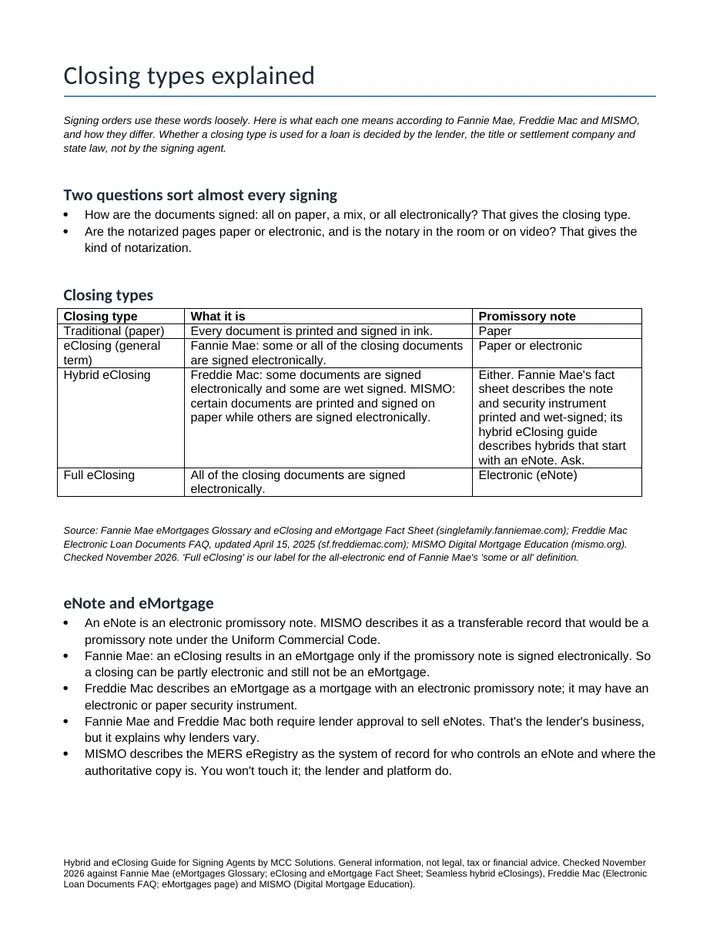
- Closing types explained. Traditional, hybrid and full eClosings, eNotes and eMortgages, and ink, RIN, IPEN and RON notarization, defined from Fannie Mae, Freddie Mac and MISMO.
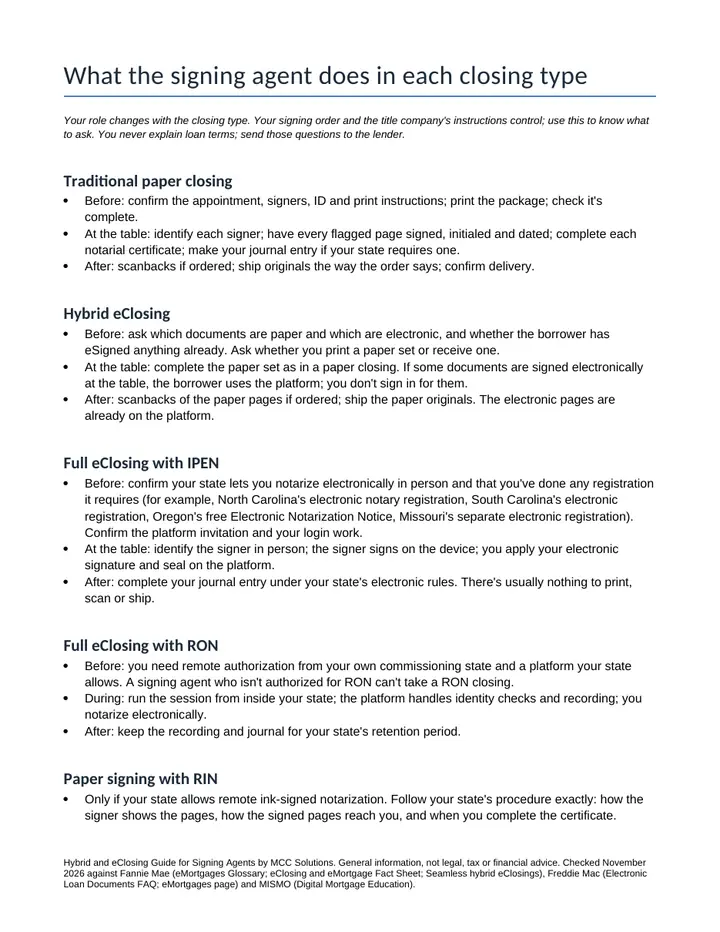
- What the agent does in each. Before, at the table and after for each closing type, plus an at-a-glance table.
- Equipment checklists. What to pack for paper, hybrid, IPEN, RON and RIN signings, and a night-before check.
- Scanbacks guide and log. When scanbacks apply by closing type, a scanning routine and a log.
- Pre-signing requirements worksheet. The questions to ask the title company and to check against state law before you accept.
A look inside
The first pages, as you will get them
Get it
Hybrid and eClosing Guide for Signing Agents
Or pay with PayPal
Uses the email and terms box above. You get the same download link by email.
Want every toolkit? The toolkit membership includes all of them, with a lower rate if you pay yearly.
Get every update for a year, $29: the Yearly Updates Pass gives you each refreshed edition we release of the kits you own. One payment, no automatic renewal.
Delivered as a zip of editable Word files and printable PDFs. For one business, your own use. General information and templates, not legal, tax or accounting advice. General information for signing agents, not legal advice. The lender's and title company's instructions and your state's notary law control. Not affiliated with Fannie Mae, Freddie Mac, MISMO or any lender or platform. Payment is handled by Stripe. If a file will not open or something looks wrong, reply to your order email and we will make it right.
Ways to get it
Just this kit, or more
Membership
$29 a month
Every kit and document pack in the store, including new ones. Cancel any time.
See the membershipQuestions
Common questions
What do I get and how is it delivered?
The Hybrid and eClosing Guide comes as a zip with five documents, each as an editable Word file and a printable PDF: Closing Types Explained, What the Agent Does in Each, Equipment Checklists, Scanbacks Guide and Log, and Pre-Signing Requirements Worksheet. The download link arrives by email after payment.
Will it open on a Mac, Google Sheets or my phone?
The PDFs open in any PDF reader, including on a phone. To edit, open the Word files in Word, Google Docs or LibreOffice on a Mac or PC. If a file will not open or something looks wrong, reply to your order email and we will make it right. If it is not right for you, email us within 14 days of buying for a full refund.
Is this legal or tax advice?
General information for signing agents, not legal advice. The lender's and title company's instructions and your state's notary law control.
Is it the right fit for me?
It is made for notary signing agents taking hybrid, electronic or remote closings, and new agents who keep seeing these terms on signing orders. Skip it if you don't do loan signings, or you need lender-specific instructions: those come from the lender and title company.
Free sample
Try one page first
Get a real page or file from this product by email. We send one confirmation email, and no series follows.
Also from MCC Solutions
New Jersey Notary Starter Kit
The paperwork a new notary has to build from scratch, ready to print or edit: a journal laid out for what New Jersey's manual says to record, checklists, forms and client emails.
$29
Start a Mobile Notary Business in NJ: Guide
A plain-language guide to getting commissioned in New Jersey and setting up a mobile notary business, with the state's rules cited and a first-month plan.
$19