Excel workbook
Monthly KPI Dashboard Workbook: Margins, Days Sales Outstanding, Cash Runway and Trends in Excel
Type in each month's revenue, costs, receivables and cash, then pick a month and see the KPIs and charts that matter, with change from last month and the same month last year.
$29 one time · 14-day full refund · example and blank copies · download link by email
🌙 The desk is asleep. The store never is.
Every kit and ebook downloads the moment you pay, day or night. Questions get answered after we open in the morning.
Browse the storeWho it is for
Owners who want a one-page monthly scorecard, and bookkeepers who send clients a monthly report.
Not the right fit if
You want a dashboard that pulls data automatically: you type each month's figures in by hand.
Why it is different
- It compares against last month and the same month last year, so a single number is never left without context.
- Each KPI is explained on its own tab, with the formula shown.
- A filled example for an invented service business and a blank copy with working formulas.
What is inside
- Start Here. Purpose, which cells to fill in and how to pick a month.
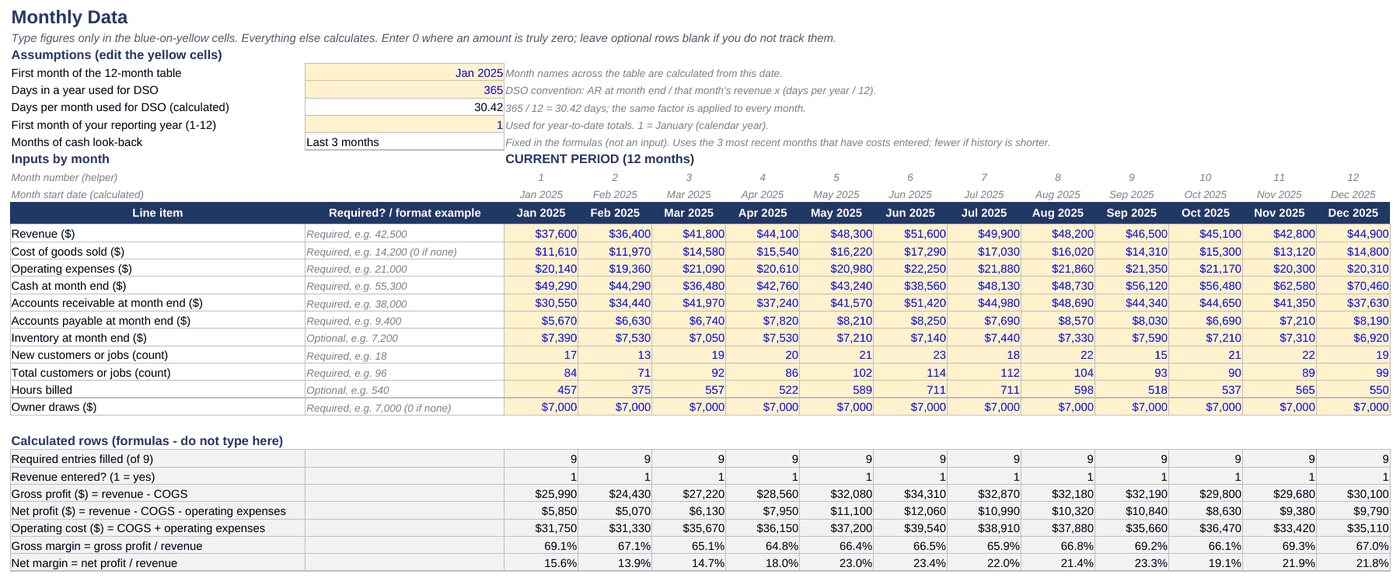
- Monthly Data. Twelve months of revenue, cost of sales, expenses, receivables, cash and customers, with an optional prior-year block.
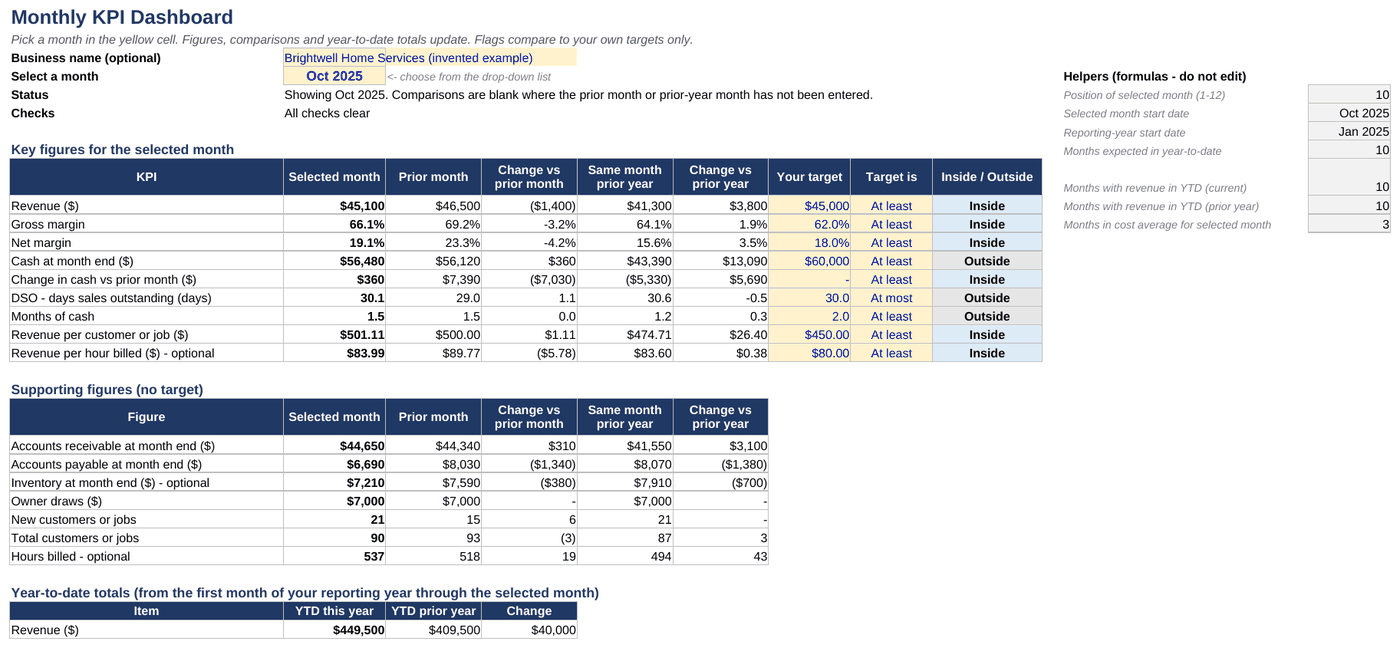
- Dashboard. Pick a month to see margins, days sales outstanding, months of cash, revenue per customer, year to date and the change from last month and last year, with charts.
- KPI Guide. What each measure means and how it is worked out.
- Checks. Gaps, incomplete months and negative cash.
A look inside
Example data, real formulas
Get it
Monthly KPI Dashboard Workbook
Or pay with PayPal
Uses the email and terms box above. You get the same download link by email.
Want every toolkit? The toolkit membership includes all of them, with a lower rate if you pay yearly.
Get every update for a year, $29: the Yearly Updates Pass gives you each refreshed edition we release of the kits you own. One payment, no automatic renewal.
Delivered as a zip with a filled example and a blank copy. Built for Excel, tested in LibreOffice; it should open in Google Sheets but not every feature is tested there. For one business, your own use. General information, not accounting, tax or legal advice. The measures are general and are only as accurate as the figures you enter. Months with no data plot as zero on the charts. Not accounting, tax or financial advice. Payment is handled by Stripe. If a file will not open or something looks wrong, reply to your order email and we will make it right.
Ways to get it
Just this kit, or more
Membership
$29 a month
Every kit and document pack in the store, including new ones. Cancel any time.
See the membershipQuestions
Common questions
What do I get and how is it delivered?
The Monthly KPI Dashboard Workbook as two Excel files in one zip: a filled-in EXAMPLE so you can see every tab working, and a BLANK copy for your own numbers, plus a README. The download link arrives by email after payment.
Will it open on a Mac, Google Sheets or my phone?
Built for Excel and tested in LibreOffice, which runs on Mac and Windows; it should open in Google Sheets, but not every feature is tested there. Phone spreadsheet apps are not tested. If a file will not open or something looks wrong, reply to your order email and we will make it right. If it is not right for you, email us within 14 days of buying for a full refund.
Is this legal or tax advice?
No, it is not accounting, tax or financial advice.
Is it the right fit for me?
It is made for owners who want a one-page monthly scorecard, and bookkeepers who send clients a monthly report. Skip it if you want a dashboard that pulls data automatically: you type each month's figures in by hand.
Rather hand it off?
We can keep the books for you each month
If tracking this yourself is more than you want to take on, we do monthly bookkeeping in QuickBooks, Xero or Excel. Tell us what you use and what is behind, and we reply with a written quote after a short review of your books. No obligation.
Get a bookkeeping quote Free books health checkPrefer to keep it yourself but want a hand getting started? Book a 45 minute setup session ($65).
Buy it with the others